

Here is a comprehensive overview of all the new features rolled out this month. This update is major → complete multilingual support, new mobile app, advanced ticket management, redesigned purchasing journey, and numerous improvements to assist you.
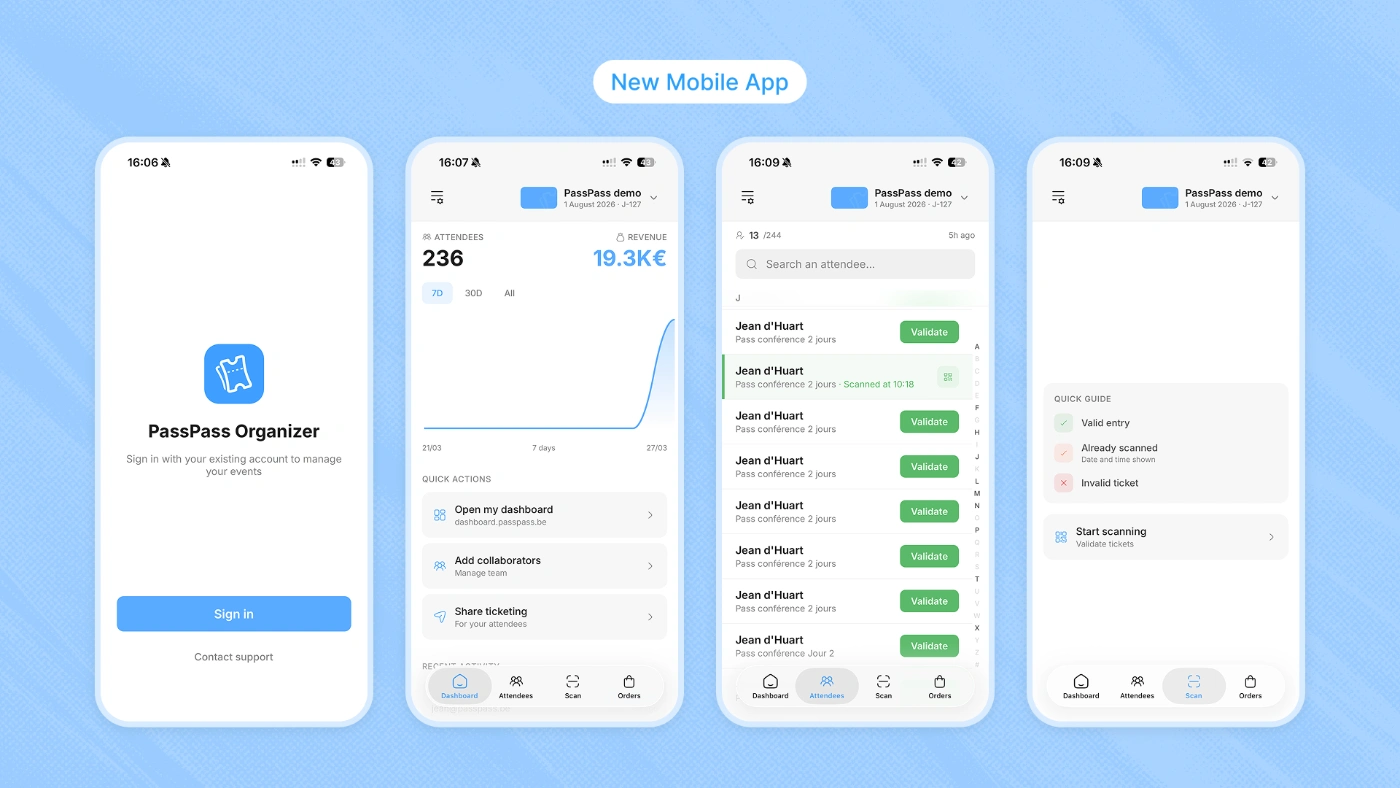
New mobile app
The PassPass mobile app has been completely rebuilt.The old app is no longer functional for access control → you need to download the new version “PassPass Organizer” from the App Store or Google Play.
What’s changing:
Redesigned interface → clearer and faster navigation
Real-time entry tracking → view the number of people entered directly from the app
Improved scanning → enhanced performance and reliability for ticket control
PassPass Organizer:
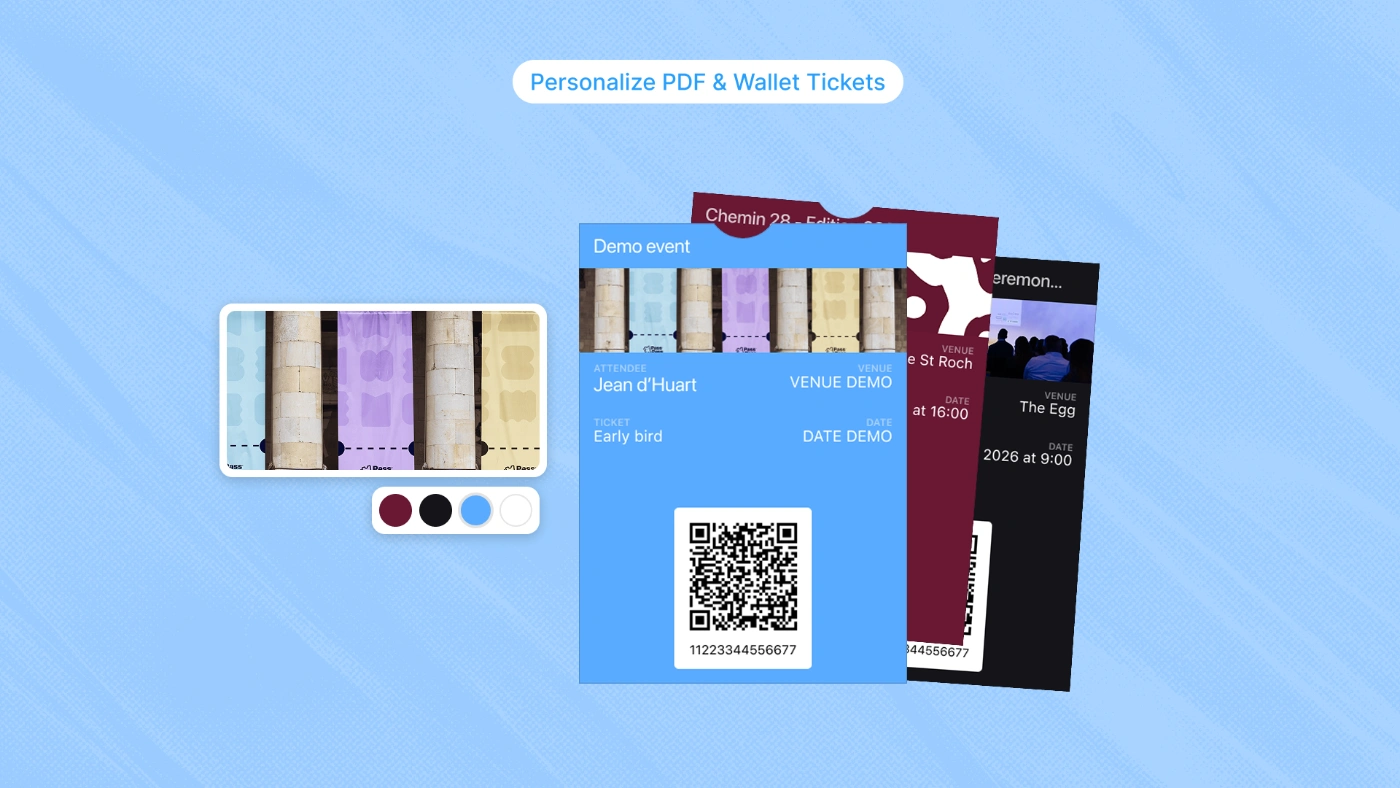
Custom ticket visuals
Each ticket can now have its own design, both on the PDF ticket and on the Wallet pass (Apple Wallet / Google Wallet).
PDF tickets
Add a custom image to the PDF ticket
Choose whether to display the event date on the ticket
Wallet pass
3 image options → event banner, custom image, or no image
Ticket assignment → assign a visual to all tickets or to specific tickets
Go to Ticket Management > Visuals to configure your designs.
Explore ticket customization: Customize your PDF and Wallet tickets
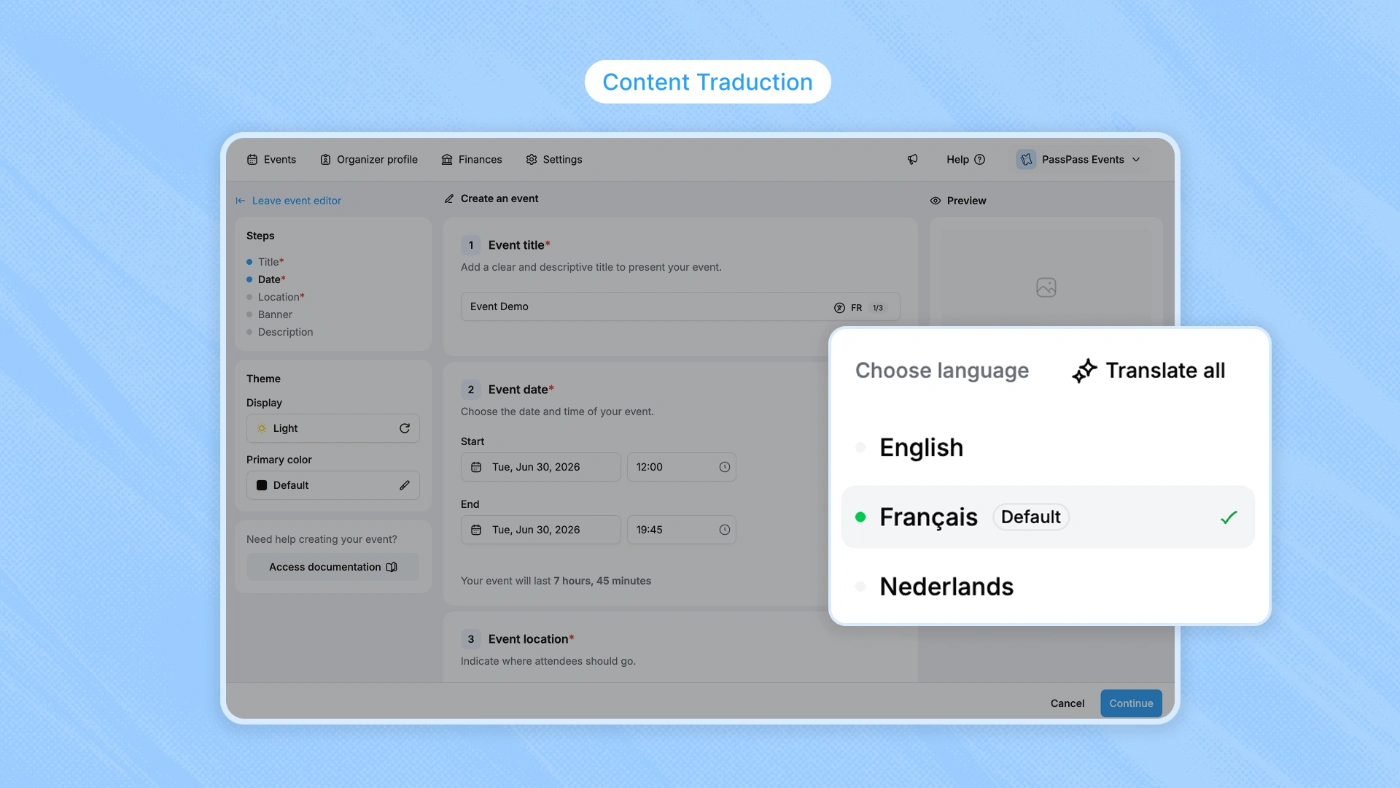
Multilingual FR / NL / EN
PassPass is now fully multilingual. You can create your event content in French, Dutch, and English, and the entire flow automatically adapts to your participant's language.
What is translated:
Event page → title, descriptions, location, all the content you write
Purchasing journey → ticket names, add-ons, form fields, buttons
Confirmation emails → sent in the participant's language
PDF and Wallet tickets → generated in the participant's language
Admin interface → the dashboard is also available in FR, NL, and EN
Each text field of your event now has a language indicator (FR, EN, NL) to write your translations directly. You can also be assisted by automatic translation.
Translate your events: Set up a multilingual event
Ticket and add-on groups
Organize your tickets and add-ons into groups to structure your sales page. Groups allow you to visually group tickets by category (e.g., "Access", "Packages", "Catering options") and apply common rules.
Configure ticket groups: Organize your tickets with groups
Advanced limits
The limits system has been completely revamped to offer more control over quantities:
Min / max per order → set a minimum and maximum number of tickets per order
Rules between groups → configure cross constraints between ticket groups (e.g., maximum 2 tickets in total between the "VIP" group and the "Premium" group)
Rules between tickets → apply combined limits between specific tickets
These rules apply automatically in the purchase journey → the participant is guided without being able to exceed the configured limits.
Hidden tickets and promo codes
Create tickets that are only visible when a buyer enters a specific promo code. This is ideal for exclusive presales, VIP access, or partner invitations.
To configure a hidden ticket → in the advanced options of the ticket, set the display to "Visible with promo code", then create a promo code associated with this ticket (even at 0% discount for simple unlocking).
Named tickets
You can now request the first name, last name, and email of each participant in a much more flexible way.
3 modes available → Mandatory, Optional, or Do not ask
Independent configuration → one setting for tickets, another for add-ons
Configuration in Purchase journey > Custom fields, section "Participant personal information".
Configurable VAT display
You can now choose how your prices are displayed to your participants. Three modes are available:
Prices including VAT (default) → the price includes VAT
Prices excluding VAT → VAT visible on tickets → each ticket displays the amount excluding VAT + VAT separately
Prices excluding VAT → VAT visible in the summary only → tickets display the price excluding VAT, VAT appears in the summary
You can also set a default VAT rate and the customize by ticket or supplement.
Configuration in Advanced configurations > VAT display.
Enhanced purchase journey
The participant side purchase journey has been redesigned to be smoother and faster:
Smoother animations → smoother transitions between steps
UX improvements → optimizations to reduce friction and increase conversions
These improvements are automatic → your buyers benefit immediately without any action on your part.
Enriched event pages
The description of your event can now include videos and images directly in the content. The same goes for the detailed descriptions of your tickets → you can enrich each ticket with visual content to better present what is included.
Formatted fields
New types of fields are available in the order form and the participant form:
Email → automatic email format validation
Phone → phone format with country code
Date → integrated date picker
Number → numeric field with validation
These formatted fields ensure clean and usable data in your exports.
Improved billing data collection
The billing form has been redesigned to save time and reduce errors.
Autocomplete by business number → enter your business number and the billing data (name, address, VAT) will fill in automatically
Adapted for businesses not subject to VAT → the form adapts to the VAT status of the business to only request the necessary information
Result → a faster purchase journey for participants ordering on behalf of a business.
Refreshed dashboard
The administration interface has been updated with a refreshed design. Navigation is clearer and the entire interface is more consistent. If you use PassPass daily, you will notice a more pleasant and faster experience.
Marketing tracking
The configuration of tracking IDs (Google Analytics, Meta Pixel, etc.) has been improved. You can add and manage your tracking identifiers more easily from Advanced configurations > Tracking & Pixels.
Integration of the Meta Pixel on your PassPass ticketing
And then?
We continue to build. The coming weeks will bring even more improvements. In the meantime, if you have any questions or feedback about these new features, feel free to contact us via the contact form on your event page or directly from the chatbot at the bottom right.